

GuidesDraft
How to read a used-car deal before you desk it
Check five numbers before you desk a used-car deal: your cost, the trade, the fees, the amount financed and the gross.
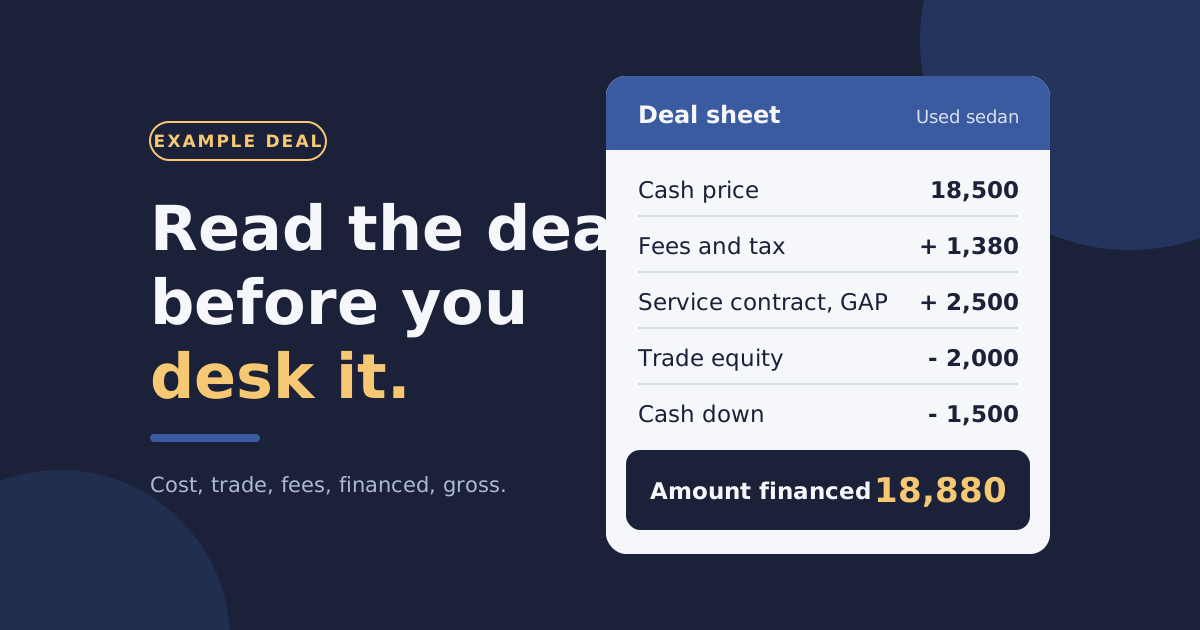
A deal can look fine at the payment and still lose money. Read five numbers first: your cost, the trade, the fees, the amount financed and the gross. This guide walks one example deal through all five.
The numbers here are one example deal
Every figure in this post belongs to one made-up deal. It is not a quote. Tax and fee rules differ by state, so use your own.
Start with what you own the car for
You can't judge a price until you know your cost. Cost is more than the auction check. It is the purchase price plus everything you spent to get the car frontline ready.
In the example, the store bought a sedan for $13,900. Recon came to $1,100. So the store owns the car for $15,000.
Count recon in the cost
A set of tires and a detail can move the cost by hundreds of dollars. Leave them out, and the gross on paper is not the gross in the bank.
FrontRow DMS keeps recon and other costs on the vehicle record, in inventory. That gives you one cost figure to desk from.
Check the book value
Look at a book value before you set the price. The example sedan books at $17,000. Hold on to that figure, because a lender measures the loan against a number like it.
FrontRow shows KBB values on the vehicle record and at the desk. Those KBB values refresh daily.
Price the trade twice
A trade has two prices. The first is the actual cash value, or ACV: what the car is worth to you today. The second is the allowance: what you show the customer for it.
In the example, the trade has an ACV of $5,200. The store allows $6,000 to make the deal. That $800 gap is an over-allowance. It comes out of your front-end gross, so write it down.
Set the ACV before the customer names a number
Appraise the trade first and write the ACV on the deal. A number set after the negotiation tends to follow the negotiation.
You can appraise the trade in FrontRow before you desk the deal. The appraisal page shows how.
Subtract the payoff
Then ask what the customer still owes. The example trade has a $4,000 payoff. Allowance less payoff leaves $2,000 of trade equity. That equity works like a down payment.
When the payoff is higher than the allowance, the equity is negative. The shortfall gets added to the new loan. Read that line twice.
Add the fees and tax before the payment
A payment quoted without fees is a payment you will have to raise. Put every line in first. The example deal carries these:
- Cash price: $18,500
- Doc fee: $85
- Title and registration: $420
- Sales tax: $875, at a 7% example rate on the price less the trade allowance
- Service contract and GAP: $2,500
Tax rules are not the same everywhere
Some states tax the full price. Others give credit for the trade. This post uses one example rate, so check your state's rule before you quote.
Work out the amount financed
Now the lines add up to one number. The amount financed is what you ask the lender to carry.
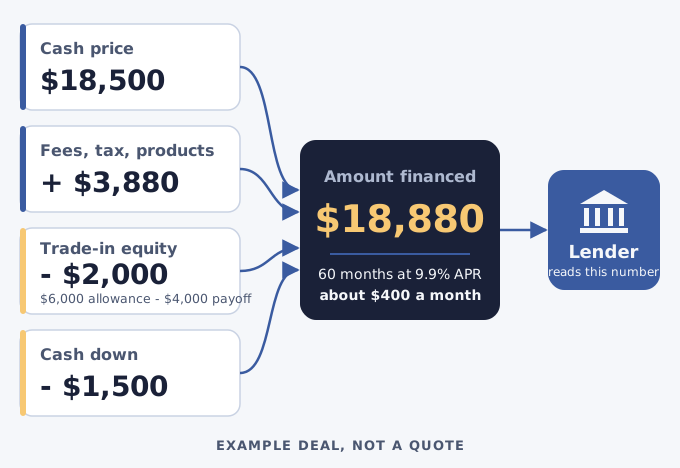
Here is the same arithmetic as a worksheet:
EXAMPLE DEAL - not a quote

Cash price                 18,500.00
Doc fee                  +     85.00
Title and registration   +    420.00
Sales tax (7% example)   +    875.00
Service contract and GAP +  2,500.00
                           ---------
Total                      22,380.00
Trade equity             -  2,000.00
Cash down                -  1,500.00
                           ---------
Amount financed            18,880.00

60 months at 9.9% APR
= 400.22 a month
At 60 months and 9.9% APR, that is about $400 a month. The rate and the term are examples too.
A payment is the last number you work out, not the first.
FrontRow DMS desks retail, lease, rent-to-own, wholesale, BHPH and cash deals. Move the term, the rate or the down payment, and the payment follows.
See how a deal goes from the desk to the paperwork, the lender and the title.
Check the deal the way a lender will
Before you send the deal, read it the way a lender will. Two ratios come first.
- Loan to value. Divide the amount financed by the book value. Here that is $18,880 over $17,000, or 111%.
- Payment to income. Divide the payment by the buyer's gross monthly income. At $4,200 a month, a $400 payment is about 9.5%.
Each lender sets its own limits, and those limits change. This post can't tell you what a lender will approve. It can tell you what to look at first. If loan to value runs high, more cash down or a lower price brings it back.
When the numbers hold up, send the deal to a lender. FrontRow submits it through RouteOne, DealerTrack or CUDL. The lender submission page covers that step.
Split the gross into front-end and back-end
Gross is two numbers, and they tell you different things. Front-end gross comes from the car. Back-end gross comes from the products sold with it.
| Line | Example deal | How to work it out |
|---|---|---|
| Front-end gross | $2,700 | Cash price, less your cost, less the over-allowance |
| Back-end gross | $1,200 | Product price of $2,500, less product cost of $1,300 |
| Total gross | $3,900 | Front-end plus back-end |
| Amount financed | $18,880 | Total, less trade equity and cash down |
| Loan to value | 111% | Amount financed over a $17,000 book value |
A deal with a thin front-end and a heavy back-end can still show a good total. It is also the deal that hurts most if a product cancels. Read both lines, not only the sum.
Read it in five steps
Here is the order, start to finish:
- Add recon to the purchase price to get your cost.
- Set the trade's ACV, then the allowance, then subtract the payoff.
- Enter every fee and the tax.
- Work out the amount financed, then the payment.
- Check loan to value and both lines of gross before you send the deal.
Run the five steps on your next deal, in that order. Plans and prices are on the pricing page.
Frequently Asked Questions
Which deal types can FrontRow DMS desk?
FrontRow DMS desks retail, lease, rent-to-own, wholesale, BHPH and cash deals. The deals page shows the desk.
What is the difference between ACV and trade allowance?
ACV is what the trade is worth to your store today. The allowance is what you credit the customer for it. Any gap between them comes out of your front-end gross.
What counts as back-end gross?
Back-end gross is the profit on products sold with the car. Service contracts and GAP are the common ones. Work it out as product price less product cost.
Should I quote a payment before I add the fees?
No. A payment without fees and tax is too low, and you will have to raise it later. Add every line first, then work out the payment.
Run your lot on FrontRow DMS
Pick a plan and start today, or click around a sample lot first. No account needed for the demo.
Joshua Aaron
Joshua Aaron is a technology writer and auto industry expert based in Los Angeles. With over 10 years of experience in dealership management systems, he helps dealers leverage technology to grow their businesses.
Filed under
- DMS
- Sales
- How-To Guide
Stay Updated
Get the latest auto dealer insights delivered straight to your inbox.
No spam. Unsubscribe anytime.